LLM Integration#
Overview#
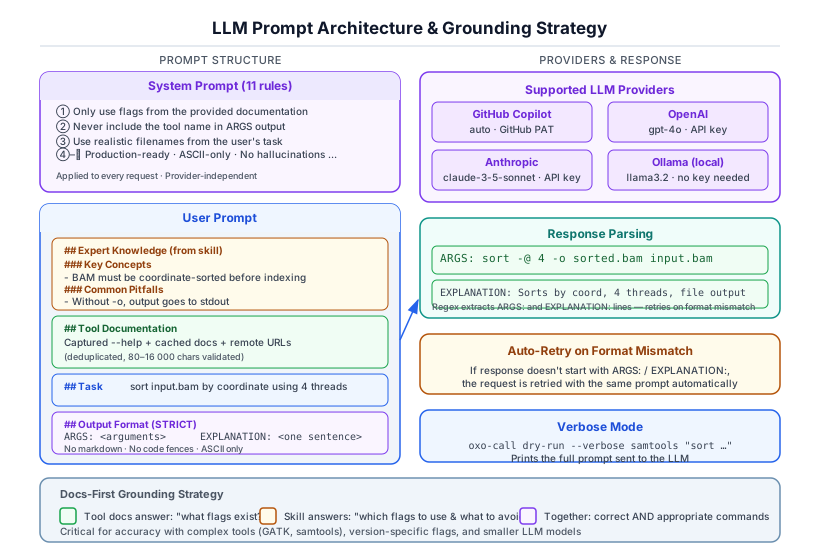
oxo-call supports multiple LLM providers for command generation:
| Provider | Default Model | Token Required |
|---|---|---|
| GitHub Copilot | gpt-5-mini (⭐ free tier) | Yes (GitHub App token via oxo-call config login) |
| OpenAI | gpt-4.1 (1M context) | Yes |
| Anthropic | claude-sonnet-4-6-20250514 (1M context) | Yes |
| Ollama | llama3.2 | No (local) |
| DeepSeek | deepseek-chat (128K context) | Yes (OpenAI-compatible API) |
| Moonshot AI (Kimi) | moonshot-v1-128k | Yes (OpenAI-compatible API) |
| ZhipuAI (GLM) | glm-4 (128K context) | Yes (OpenAI-compatible API) |
| MiniMax | minimax-chat (1M context) | Yes (OpenAI-compatible API) |
LLM Roles#
oxo-call uses the LLM in up to three distinct roles per invocation:
| Role | Trigger | System Prompt |
|---|---|---|
| Command generation (always) | Every run / dry-run |
Expert bioinformatics command generator |
| Task optimization (automatic) | Pre-generation step | Expand and clarify the user's task description |
Result verification (--verify) |
Post-execution step | Expert bioinformatics QC analyst |
Each role uses a separate system prompt so the LLM behaves appropriately for the job.
Command Generation Prompt#
System Prompt#
The command generation system prompt uses 10 concise rules that are optimised for reliability across all model sizes. Three variants exist (see Adaptive Prompt Compression below); this section describes the Full variant used for large models.
Format Rule
- Respond with EXACTLY two labeled lines:
ARGS:andEXPLANATION:. No other text.
Invocation Rules (2–5)
- NEVER start ARGS with the tool name (auto-prepended by system).
- First token = subcommand (sort, view, mem, index, etc), NEVER a flag.
- Companion binaries (e.g.
bowtie2-build) or scripts (e.g.bbduk.sh) go as first token when skill docs say so. - Generate one target-tool invocation. Do not invent dependent steps or a DAG; preserve shell composition only when the task explicitly requests it.
Accuracy Rules (6–7)
- Use ONLY flags from docs or skill examples — never invent flags.
- Include every file/path from the task. Prefer skill example flags. Include threads (
-@/-t/--threads) and output (-o) when applicable.
Convention Rules (8–10)
- Default conventions: paired-end, coordinate-sorted BAM, hg38, gzipped FASTQ, Phred+33.
- Match format flags to actual types (BAM/SAM/CRAM, gzipped/plain, paired/single, FASTA/FASTQ).
- If no arguments needed:
ARGS: (none).
Response Format#
The LLM must respond with exactly two labeled lines:
If the response doesn't match this format, oxo-call retries the request.
Raw Prompt Example#
Below is an example of the complete user prompt sent to the LLM for a samtools sort task using the Full tier. The system prompt (shown above) is sent separately; the user prompt focuses on context and task.
# Tool: `samtools`

## Expert Knowledge (from skill)

### Key Concepts
- BAM files MUST be coordinate-sorted before indexing with samtools index
- Use -@ to set additional threads for parallel processing
- samtools view -F 0x904 filters out unmapped, secondary, and supplementary reads

### Common Pitfalls
- Forgetting to index after sorting — samtools index requires a coordinate-sorted BAM
- Using -q without -b — quality filtering without BAM output produces SAM to stdout
- Not specifying -o — output goes to stdout by default, which can corrupt terminal

### Worked Examples
Task: sort a BAM file by coordinate
Args: sort -o sorted.bam input.bam
Explanation: coordinate sort is the default; -o specifies output file

Task: index a sorted BAM file
Args: index sorted.bam
Explanation: creates .bai index required for random access

## Tool Documentation
<captured --help output and cached documentation>

## Task
sort input.bam by coordinate and output to sorted.bam

## Output
ARGS: <subcommand then flags, NO tool name>
EXPLANATION: <brief>
For the Compact tier (used with ≤3B models), the prompt uses a few-shot format:
Tool: samtools

Task: Sort a BAM file by coordinate

---FEW-SHOT---

ARGS: sort -@ 4 -o sorted.bam input.bam
EXPLANATION: Sort BAM by coordinate with 4 threads.

---FEW-SHOT---

Tool: samtools
Task: sort bam by coordinate
Use --verbose mode to see the actual prompt for any command:
Automatic Task Normalization#
oxo-call uses a doc-enriched prompting strategy that works in a single LLM call by default:
-
Structured Doc Extraction (deterministic, no LLM): When documentation is fetched, oxo-call extracts a structured
FlagEntrycatalog and concrete command examples from the help text. This is injected directly into the prompt. -
Default (Fast) mode: A single LLM call with the doc-enriched prompt. The flag catalog prevents hallucinated flags and doc-extracted examples serve as few-shot demonstrations — critical for small models (≤3B).
-
Quality mode (via
--scenario full): Multi-stage command generation with optional task normalization, mini-skill generation, and doc cleaning. Activated only when explicitly requested or when the generation pipeline determines high complexity and no skill is available. When a skill is available, the pipeline always selects Fast mode since the skill already provides the grounding that Quality mode would generate.
When Quality mode is active:
- Task standardization and mini-skill generation run concurrently via
tokio::join!when both are needed, reducing wall-clock latency by up to 50%. - Mini-skill cache is keyed by
(tool, doc_hash)rather than(tool, task, doc_hash), so the second invocation for the same tool is always a cache hit regardless of the user's task description. - Task standardization only triggers when the task is shorter than 10 characters, contains vague keywords (e.g., "just", "simply"), or contains non-ASCII characters.
When the task is normalized, the enriched version:
- Expands ambiguous terms into specific operations (e.g., "sort bam" → "sort BAM file input.bam by genomic coordinate and write to sorted.bam")
- Infers bioinformatics defaults (paired-end reads, hg38, 8 threads, gzipped output, Phred+33 encoding)
- Specifies output file names when omitted (derived from input names)
- Preserves all file names, paths, and sample identifiers from the original task
- Responds in the same language as the original task
Doc-Enriched Prompt Architecture#
The key innovation for doc-only accuracy: DocProcessor deterministically extracts
structured knowledge from --help output and injects it into the prompt.
Flag Catalog Extraction
# From: samtools sort --help
OPTIONS:
  -o FILE    Write final output to FILE
  -@ INT     Number of additional threads
  -n         Sort by read name

# Extracted FlagEntry catalog:
-o FILE → "Write final output to FILE"
-@ INT  → "Number of additional threads"
-n      → "Sort by read name"
This catalog is injected into the prompt as "Valid Flags" — the LLM learns which flags actually exist and avoids hallucinating non-existent ones.
Doc-Extracted Examples
Command-line examples from the EXAMPLES section (lines with $ prompts, shell pipes,
or flag patterns) are extracted and used as few-shot demonstrations:
# Extracted from help text:
$ samtools sort -o sorted.bam input.bam
$ samtools sort -@ 4 -o out.bam in.bam
For Compact/Medium prompt tiers, these are injected as ---FEW-SHOT--- user/assistant
pairs, which is critical for ≤3B models that learn better from examples than from rules.
Quality Score
A deterministic 0.0–1.0 score computed from doc completeness:
| Component | Weight |
|---|---|
| USAGE section present | 0.25 |
| EXAMPLES section present | 0.25 |
| Extracted command examples (up to 5) | 0.25 |
| Flag catalog entries (up to 10) | 0.15 |
| Subcommands present | 0.05 |
| Quick reference flags | 0.05 |
Result Verification (--verify)#
When --verify is set on run, an extra LLM call is made after execution. The LLM acts as a bioinformatics QC analyst and analyses:
- The exit code (with awareness that some tools use non-zero for warnings, exit 137 = OOM, exit 139 = segfault)
- Error signals in stderr (ERROR, FATAL, Exception, Traceback, Segmentation fault, OOM, Permission denied, etc.)
- Declared output files — their existence and sizes (zero-byte = suspicious)
- Tool-specific patterns (e.g., samtools truncated-BAM warnings, STAR alignment rate, GATK exceptions, BWA reference errors)
- Distinguishes fatal failures from harmless noise (progress bars, INFO/NOTE messages, version banners)
The structured response includes:
STATUS: success | warning | failureSUMMARY:a one-sentence verdict in the same language as the taskISSUES:a list of detected problems (empty when clean)SUGGESTIONS:actionable fixes
Verification is advisory — it never changes the process exit code. In JSON mode (--json), a verification block is appended to the output.
Provider Configuration#
See the Configuration tutorial for setup instructions.
Grounding Strategy#
oxo-call uses a "docs-first" grounding strategy with three layers:
- Doc-extracted grounding (deterministic): Flag catalog and command examples
extracted from
--helpoutput are injected into every prompt. This prevents flag hallucination even without skill files. - Skill grounding (when available): Expert-authored concepts, pitfalls, and examples from skill files provide deeper domain knowledge.
- Self-learning cache: Successful commands are cached by tool+task+doc hash, becoming implicit few-shot examples for future similar tasks.
This layered approach means:
- With skill file: Best accuracy — skill examples + doc grounding + cache
- Without skill file: High accuracy — doc-extracted examples + flag catalog + cache
- Without docs: Degraded but functional — model knowledge + cache only
The doc-enriched prompt is the key innovation for achieving reliable results
with small models (≤3B parameters) using only --help output.
Adaptive Prompt Compression#
When llm.context_window is configured (or auto-detected from the model
name), oxo-call automatically compresses prompts to fit the model's context
budget. Three tiers are used, each with a purpose-built system prompt and
user prompt strategy:
| Tier | Context Window | System Prompt | User Prompt Strategy | Target Models |
|---|---|---|---|---|
| Full | ≥ 16k or unknown | 10 rules (~450 tokens) | Skill → Docs → Task → concise Output | 7B+, ≥16K context |
| Medium | 4k – 16k | Medium-specific (~120 tokens) | Skill(5 examples) → truncated Docs → Task → Output | 4–7B, 4K–16K context |
| Compact | ≤ 4k | Concrete example + 3 rules (~80 tokens) | Few-shot(2 examples or fallback) → optional Docs → Task | ≤3B, any context |
Tier Design Philosophy#
Full — For models that can effectively use all available context. The system prompt contains 10 comprehensive rules; the user prompt injects full skill knowledge and complete documentation before the task.
Medium — For mid-range models with limited but usable context. Uses a dedicated, shorter system prompt. Documentation is truncated to fit the remaining budget after skill examples (up to 5, task-relevant selection) are included. Docs are placed after skill but before task, so the model focuses on expert knowledge first.
Compact — For small models (≤3B) that suffer from context overflow. Key design decisions:
- Few-shot > instructions: Small models imitate better than they follow
rules. The
---FEW-SHOT---markers create user/assistant/user turns that demonstrate the exact output format. - Doc-extracted examples as few-shot: When no skill is loaded but documentation is available, command examples extracted from the help text are used as few-shot demonstrations. This grounds the model in the tool's actual flag format without needing a skill file.
- Concrete examples > abstract placeholders: The system prompt uses
ARGS: sort -@ 4 -o out.bam in.baminstead ofARGS: <subcommand then flags>, because some models (e.g., starcoder2) would literally output the placeholder text. - Flag catalog injection: Even in Compact tier, a brief "Valid flags" line is included to prevent flag hallucination.
- No format template in the final user message: Including
Output:\nARGS:
   sort...
causes some models to output empty — they interpret the template as the answer already being provided. - Selective documentation injection: When no skill examples are available, a heavily truncated doc section is injected as the only grounding source.
Auto-Detection#
The context window is inferred from common model name patterns:
| Model Name Pattern | Detected Context | Tier |
|---|---|---|
qwen2.5-coder:0.5b, phi-3:3b |
2,048 | Compact |
llama3:8b, deepseek-coder-v2:16b |
8,192 | Medium |
qwen2.5:72b, llama3:70b |
32,768 | Full |
gpt-4.1, gpt-4.1-mini, gpt-4.1-nano |
1,047,576 (~1M) | Full |
gpt-4o, gpt-5-mini, gpt-4o-mini |
128,000 | Full |
claude-opus-4-6, claude-opus-4-7, claude-sonnet-4-6 |
1,000,000 | Full |
claude-3-5-sonnet, claude-4 |
200,000 | Full |
gemini-2.5, gemini-3 |
1,000,000 | Full |
deepseek-v3, deepseek-r1, deepseek-v2 |
131,072 (128K) | Full |
deepseek-coder |
16,384 | Medium |
moonshot-v1-8k |
8,000 | Medium |
moonshot-v1-32k |
32,768 | Full |
moonshot-v1-128k, kimi-* |
128,000 | Full |
kimi-k2.5 |
256,000 | Full |
glm-4, glm-4-flash, chatglm-* |
128,000 | Full |
glm-4-long, glm-5.1 |
1,000,000+ | Full |
minimax-m2.7 |
1,000,000 | Full |
Manual Configuration#
Override auto-detection via config.toml or environment variables:
[llm]
context_window = 4096   # force Medium tier
prompt_tier = "compact"  # force Compact tier regardless of context_window
Or per-invocation:
# Force a specific tier
oxo-call config set llm.prompt_tier compact    # ≤3B models
oxo-call config set llm.prompt_tier auto       # auto-detect (default)

# Override context window
oxo-call config set llm.context_window 2048    # force Compact

# Per-invocation via environment
OXO_CALL_LLM_PROMPT_TIER=compact oxo-call dry-run samtools "sort bam"
Design Rationale#
Mini models (≤ 3B parameters) suffer from context overflow — when the prompt exceeds their effective context, the output quality degrades sharply (empty output, format violations, hallucinated flags). The Compact tier addresses this by:
- Reducing system prompt from ~1,600 characters (16 rules) to ~200 characters (concrete example + 3 rules)
- Using few-shot instead of format instructions — small models imitate better than they follow abstract rules
- Limiting to 2 most-relevant examples as few-shot assistant messages
- Omitting raw documentation unless no skill examples are available
- Avoiding format templates in the user message that confuse small models
Small Model Performance#
After the 3-tier prompt system redesign, small model accuracy improved dramatically:
| Model | Parameters | Before | After |
|---|---|---|---|
| qwen2.5-coder | 0.5B | ~0% | 83–100% |
| deepseek-coder | 1.3B | ~20% | 75–100% |
| llama3.2 | 3B | ~0% | 100% |
| starcoder2 | 3B | ~0% | 91% |
| ministral | 3B | ~0% | 100% |
"Before" = original Full-tier prompt on all models. "After" = automatic tier selection with the redesigned prompt system.
LLM Response Caching#
oxo-call can cache LLM responses to avoid redundant API calls for similar or identical prompts. This is particularly useful for:
- Repeated tasks with the same tool and similar descriptions
- Development and testing workflows
- Cost optimization when using paid LLM APIs
How It Works#
The cache uses a semantic hash computed from:
- Tool name
- Task description (normalized)
- Documentation hash
- Skill name (if used)
- Model identifier
When cache is enabled and a matching entry exists, the cached response is returned immediately without an LLM API call.
Configuration#
Cache is disabled by default for independent benchmarking. Enable it via:
# Enable caching
oxo-call config set llm.cache_enabled true

# Check cache status
oxo-call config get llm.cache_enabled
Cache Behavior#
| Setting | Behavior |
|---|---|
llm.cache_enabled = true |
Cache hits return cached responses; misses are stored after LLM call |
llm.cache_enabled = false |
All requests go to LLM (default) |
--no-cache flag |
Bypasses cache for this invocation (fetches fresh docs, ignores cached LLM response) |
Cache Storage#
- Location:
~/.local/share/oxo-call/llm_cache.jsonl - Format: JSONL (one JSON object per line)
- Expiration: 7 days
- Metadata: Each entry stores tool, task, args, explanation, model, timestamp, and hit count
Cache Priority#
When cache is enabled:
- Cache hit (exact semantic match) → return cached response
- User preferences from command history → inform the LLM prompt
- Fresh LLM call → generate and cache new response
Streaming Response (SSE)#
By default, oxo-call uses Server-Sent Events (SSE) streaming for all LLM API calls. This means tokens are printed to stderr as they arrive, reducing perceived latency for the user — especially for large models and complex tasks.
How it works#
- The HTTP request is sent with
"stream": true. - The API returns a stream of
data:lines (SSE protocol). - Each chunk is parsed for content deltas and printed to stderr immediately.
- After the stream completes, the full collected response is parsed as usual (e.g.,
ARGS:/EXPLANATION:extraction).
Because streaming output goes to stderr, stdout remains clean — JSON output, piped commands, and scripting work exactly as before.
Disabling streaming#
Streaming can be disabled in two ways:
Per-invocation — pass --no-stream to any LLM-backed command:
oxo-call run --no-stream samtools "sort bam by coordinate"
oxo-call dry-run --no-stream bwa "align reads"
oxo-call chat --no-stream samtools "how to sort"
oxo-call server run --no-stream mycluster samtools "sort bam"
Globally — set the llm.stream config key:
# Disable streaming globally
oxo-call config set llm.stream false

# Re-enable streaming
oxo-call config set llm.stream true
Performance considerations#
Streaming adds minimal overhead:
- Network: SSE chunks are typically the same size as a non-streaming response; the total data transferred is identical.
- CPU: Parsing individual JSON chunks is lightweight (a few microseconds per chunk).
- Latency: First-token latency is significantly reduced because the user sees output as soon as the first token is generated, rather than waiting for the full response.
Disable streaming (--no-stream or llm.stream = false) when:
- Running in non-interactive environments (CI, batch scripts) where stderr output is undesirable
- Benchmarking LLM response times (streaming adds small per-chunk overhead that affects timing measurements)
- Using providers that don't support SSE (rare — all major providers support it)